From Vibe Coding to Spec-Driven Development
Nowsadays, Modern AI coding tools like GitHub Copilot / Claude Code or IDE like Cursor / Windsurf have accelerated how we write software—but they’ve also introduced a new habit: vibe coding. Developers often jump straight into implementation based on intuition or incomplete prompts. The result? Misaligned intent, inconsistent architecture, and fragile systems.
Spec-Driven Development (SDD) changes this by putting the specification at the center of the workflow. Instead of coding first and documenting later, you write the spec, then let your AI agent execute it.
What Is Spec-Driven Development?
Spec-Driven Development (SDD) is a methodology where specifications define the intent, context, and constraints before any code is written.
Each feature begins with a structured description of what to build and why it matters. AI tools then assist in planning, implementing, and validating code that fulfills that spec.
Benefits
- Alignment between product, design, and engineering
- Traceability of every decision
- Predictable AI output based on clear context
- Lower maintenance and onboarding cost
In short: the spec becomes the single source of truth — and code simply implements it.
When coming to SDD, we as developers might be familiar with IDE-integrated tools like JetBrains Writerside. The workflow might be using different AI tools to write the specs and then using the tool to generate code implementation. For lazy people like me, I prefer to have a tool that can do it all. So let’s investigate Github Speckit in this blog entry.
WTF is GitHub Spec Kit?
GitHub Spec Kit is an open-source toolkit that operationalizes Spec-Driven Development across your preferred AI agents. Spec Kit can:
- Works with multiple AI agents (Copilot, Claude Code, Gemini CLI, Cursor, etc.)
- Defines project principles (
/constitution) and feature life cycles (/specify → /plan → /tasks → /implement) - Standardizes how teams reason, plan, and evolve codebases
Github Spec Kit Workflow
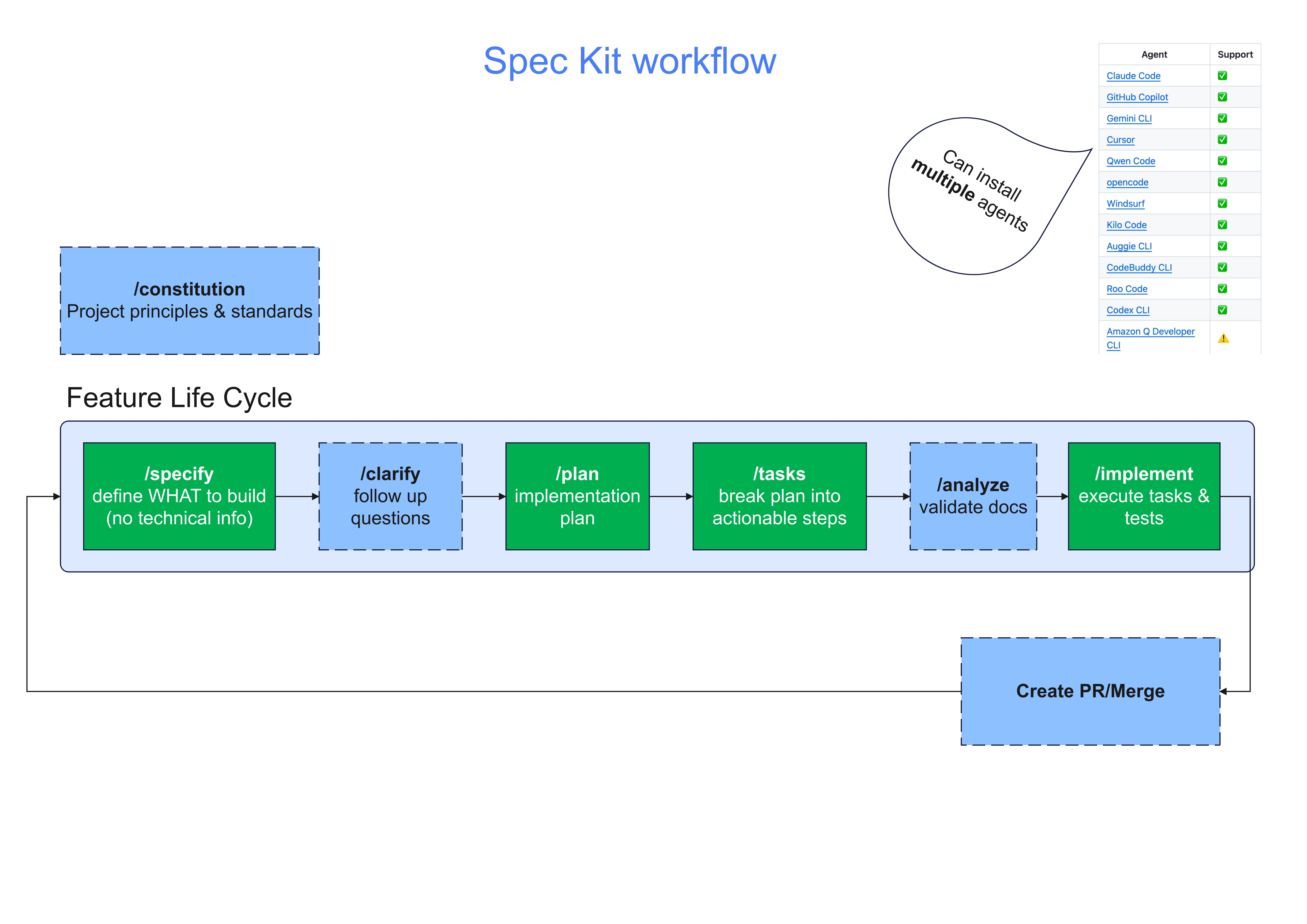
The workflow is straightforward:
| Stage | Command | Purpose |
|---|---|---|
| /speckit.constitution | Define project principles & standards | One-time setup (optional) |
| /speckit.specify | Describe what to build (no technical detail) | Feature definition |
| /speckit.clarify | Ask or answer follow-up questions | Scope refinement (optional) |
| /speckit.plan | Design implementation approach | Architectural planning |
| /speckit.tasks | Break plan into actionable steps | Execution checklist |
| /speckit.analyze | Validate specs & docs | QA alignment (optional) |
| /speckit.implement | Execute tasks & run tests | Actual coding |
Getting Started with Github Spec Kit
1. Install Spec Kit
uv tool install specify-cli --from git+https://github.com/github/spec-kit.git
specify check
2. Initialize a Project
specify init my-tasks --ai copilot
You can choose other agents: --ai claude, --ai gemini, --ai cursor, etc. We can also use multiple agents within 1 project 🙂
After the above step, we can use the speckit commands inside our agent interface. I prefer to use Github Copilot so I can also use the commands inside VS Code.

3. Start using Github Spec Kit in your project
Let’s walk through creating a local-first personal task app.
- Define project principles:
/speckit.constitutionEstablish quality, accessibility, and security standards. NEVER delete database in production or development environments, ALWAYS create migration scripts instead. - Specify the feature:
/speckit.specifyA personal task app where users add, edit, and mark tasks complete. Persist tasks locally. - Create the implementation Plan:
/speckit.planChoose stack (Vite + TypeScript), set constraints (small bundle, simple UI). - Generate Tasks:
/speckit.tasksConvert plan into discrete actions. - Implement & Validate:
/speckit.implementRun, review, and iterate. - Commit & Merge:
git add . && git commit -m "Implement basic task manager via Spec Kit"
The thing I love when working with Github Spec Kit is that whenever we develop a new feature (by starting doing /specify), it will automatically create a new git branch to separate the new things from the (stable) master/main branch. Adopting this into the existing development workflow is seamlessly and we can confidently work on the new thing without worrying messing up the current working codebase.
Conclusion
Spec-Driven Development bridges the gap between intent and implementation.
By pairing GitHub Spec Kit with AI coding agents, we can create a repeatable, auditable workflow that transforms how software is planned and built.
As always, be sure to check every generated steps, do not rely 100% on any tool 🙂
Side notes (Updated after the post date :D)
- Read more about the conversation on how to manage context evolving. I like the idea of the following link https://github.com/github/spec-kit/discussions/152#discussioncomment-14970532
- Read more about advanced context engineering: https://github.com/humanlayer/advanced-context-engineering-for-coding-agents/blob/main/ace-fca.md